Are Fitness Apps Compatible with a Functional Trainer?
On this page (9 sections)
- Connecting Your Functional Trainer to Fitness Apps
- Why Pair Your Functional Trainer with an App?
- What to Look for in a Smart Functional Trainer
- Setting Up Your Connected Workout
- Maximizing Your Training with Data
- Troubleshooting Common Connection Issues
- Making the Most of Your Smart Functional Trainer Setup
- Conclusion
- Frequently Asked Questions
Yes, fitness apps are generally compatible with a functional trainer, especially those with Bluetooth capabilities. Many modern functional trainers allow you to connect wirelessly to your smartphone or tablet. This connection lets the app track your workouts in real-time. It’s a fantastic way to monitor your progress and stay motivated.
When you pair your functional trainer with a fitness app, you can often see data like weight lifted, reps, and sets instantly. Some apps even offer personalized training plans. They can guide you through exercises and provide feedback. This makes your home gym feel like a high-tech training facility.
- Fitness apps can connect to many functional trainers.
- Look for trainers with Bluetooth or smart features.
- Apps help you track workouts and progress.
- Some apps offer guided workouts and real-time feedback.
- It’s a great way to make training more engaging.
Let’s dive into how you can make sure your setup works smoothly and what to look for.
Connecting Your Functional Trainer to Fitness Apps
So, you’re wondering if your trusty functional trainer can play nice with those slick fitness apps you see everywhere? The short answer is a resounding yes! Many modern functional trainers are designed with connectivity in mind, making it easier than ever to blend your physical workouts with digital tracking and guidance.
This partnership between hardware and software can really boost your training experience. Imagine getting real-time feedback as you lift, track your progress effortlessly, and even have a virtual coach guiding your every move. It’s not science fiction; it’s becoming standard for many home gyms.
Why Pair Your Functional Trainer with an App?
Think of it like this: your functional trainer is the engine of your workout. A fitness app is the dashboard and the GPS. It tells you how you’re performing, where you’re going, and helps you optimize your journey. You get a much clearer picture of your efforts and results.
This digital connection can transform a good workout into a great one. You’re not just guessing if you’re improving; you’re seeing it. This data-driven approach can keep you motivated and help you push past plateaus. It’s about making your fitness goals more tangible.
Tracking Your Gains and Progress
One of the biggest wins is the ability to track your workouts accurately. Most apps designed for connected equipment can automatically log your sets, reps, and the weight you’re lifting. This takes the mental load off you during your session. You can focus on your form and exertion.
We found that automatic tracking is a game-changer for many users. It removes the need for pen and paper or trying to remember numbers. Over time, this data builds a detailed history of your strength progression. You can see how far you’ve come, which is incredibly motivating.
Guided Workouts and Personalized Plans
Beyond simple tracking, many apps offer guided workouts. These aren’t just random exercises; they’re often curated programs designed for specific goals, like building muscle or improving endurance. The app can instruct you on what to do next and how to do it.
Some advanced systems even use your performance data to tailor workouts specifically for you. If you’re finding a certain weight too easy, the app might suggest increasing it. Conversely, if you’re struggling, it can recommend modifications. This kind of personalized attention used to require a personal trainer.
What to Look for in a Smart Functional Trainer
Not all functional trainers are created equal when it comes to app compatibility. The key feature you’ll want to seek out is wireless connectivity. This usually means Bluetooth technology built into the trainer itself. It’s the invisible thread that connects your machine to your smart device.
When browsing for a new trainer, check the product specifications carefully. Look for phrases like “Bluetooth enabled,” “app connectivity,” or “smart trainer.” These indicate that the manufacturer has integrated the technology needed for your functional trainer to communicate with a fitness app. This makes your investment future-proof for digital integration.
Bluetooth: The Magic Connector
Bluetooth is the most common method for connecting your functional trainer to your smartphone or tablet. It’s a low-energy wireless technology that allows devices to communicate over short distances. Think of it like your wireless headphones connecting to your phone. Your trainer does the same thing with your app.
Make sure your smartphone or tablet also has Bluetooth enabled. You’ll typically pair the devices through the fitness app itself or your device’s Bluetooth settings. Once connected, the trainer sends workout data to the app in real-time. This seamless connection is what powers all the smart features you want.
Proprietary vs. Third-Party Apps
Some functional trainers come with their own dedicated fitness apps. These are often designed to work perfectly with that specific brand’s equipment. They might offer the most integrated experience, with features tailored to the trainer’s capabilities. For example, a brand might have an app with exclusive workout programs.
Other trainers might be compatible with a wider range of third-party fitness apps. This can give you more choice in terms of workout styles, tracking features, and user interface. Always check the manufacturer’s recommendations or the app store description to see which apps are supported. Sometimes, a trainer can connect to multiple apps, giving you flexibility.
Setting Up Your Connected Workout
Getting started is usually quite straightforward. Once you have a compatible functional trainer and a smartphone or tablet, you’ll want to download the recommended fitness app. Most manufacturers will guide you on which app to choose.
After downloading, you’ll likely need to create an account. Then, the app will prompt you to connect your trainer. Follow the on-screen instructions. This usually involves ensuring your trainer is powered on and in pairing mode, then selecting it from a list of available Bluetooth devices within the app. It’s often a simple “tap to connect” process.
Ensuring a Stable Connection
A stable connection is key for an uninterrupted workout experience. Keep your smart device relatively close to the functional trainer. Walls or other electronic devices can sometimes interfere with Bluetooth signals, though typically the range is quite sufficient for most home gym setups.
Make sure your device’s battery is charged. There’s nothing more frustrating than your app cutting out mid-set because your phone died. Many experts recommend keeping your device plugged in if you’re doing a longer workout session. This ensures the app can continue to send and receive data without interruption.
Maximizing Your Training with Data
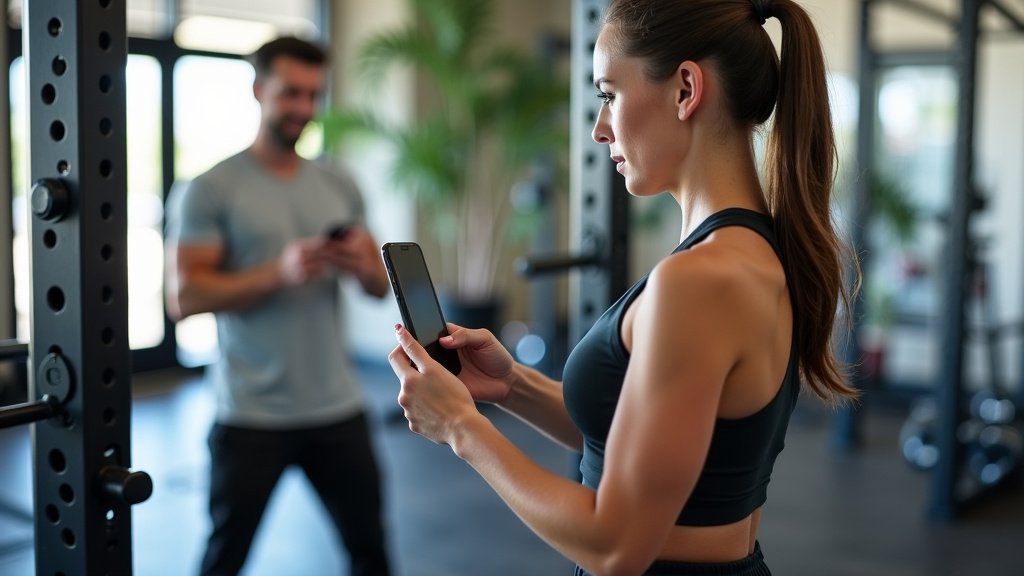
With your trainer and app connected, you now have access to a wealth of data. Don’t just let it sit there! Use it to inform your training decisions. Look at your historical data to see where you’ve made progress and where you might be falling short.
For instance, if you see that your squat weight has steadily increased over the past month, that’s a clear sign your program is working. If your rep count on a particular exercise has plateaued, it might be time to adjust your training strategy. This informed approach helps you train smarter, not just harder.
Understanding Your Metrics
Beyond just weight and reps, some apps track other metrics. These can include workout duration, estimated calories burned, and rest times between sets. Understanding these can give you a more complete picture of your overall effort and fitness level. For example, consistently shorter rest times might indicate improved cardiovascular fitness.
The Mayo Clinic often highlights the importance of consistency and tracking in fitness programs. They suggest that monitoring progress helps individuals stay accountable and make necessary adjustments. Your app provides an easy way to do just that. It helps you see the long-term benefits of your hard work.
Troubleshooting Common Connection Issues
Occasionally, you might run into hiccups. If your app isn’t connecting to your trainer, the first step is often the simplest: restart both devices. Turn off your functional trainer, close the fitness app completely on your smart device, and then turn everything back on. This resolves many minor software glitches.
If that doesn’t work, check your Bluetooth settings on your smartphone or tablet. Ensure Bluetooth is turned on and that your trainer is still listed as a paired device. Sometimes, you might need to “forget” the device in your Bluetooth settings and then re-pair it through the app. This can refresh the connection.
When to Seek Further Help
If you’ve tried the basic troubleshooting steps and are still having trouble, it’s time to consult the resources provided by the manufacturer. Check the user manual that came with your functional trainer. It will often have a dedicated troubleshooting section for connectivity issues.
Most manufacturers also have online support portals, FAQs, or customer service contact information. They can provide specific guidance for their equipment. Don’t hesitate to reach out to them. They want your smart gym experience to be as smooth as possible. The National Institutes of Health (NIH) also provides resources on technology in health and fitness, often pointing users to manufacturer support for device-specific issues.
Making the Most of Your Smart Functional Trainer Setup
Integrating a fitness app with your functional trainer can truly revolutionize your home workouts. It provides structure, motivation, and detailed progress tracking. You gain insights that can help you train more effectively and achieve your fitness goals faster.
Remember to explore all the features the app has to offer. Many apps include workout libraries, progress charts, and community features. Take the time to learn your way around. The more you utilize these tools, the greater the benefit you’ll see from your connected fitness journey. It’s an exciting way to make your fitness routine more engaging and rewarding.
Quick Checklist for a Smooth Setup
- Ensure your functional trainer has Bluetooth or smart capabilities.
- Download the correct fitness app recommended by the manufacturer.
- Make sure your smartphone/tablet has Bluetooth enabled and is charged.
- Follow the app’s instructions to pair your trainer.
- Keep your device close to the trainer for a stable connection.
- Don’t be afraid to restart devices if connection issues arise.
Conclusion
You’ve seen how well your functional trainer and fitness apps can work together. This powerful combination can truly transform your home workouts. By tracking your progress and following guided programs, you gain a clearer path to your fitness goals. You’re not just exercising; you’re training smarter. Make sure your trainer has Bluetooth and download the right app to get started. Take the next step and connect your equipment to see just how much more engaged and effective your training can become. Your fitness journey just got a high-tech upgrade.
Frequently Asked Questions
Do I need a specific brand of functional trainer for app compatibility?
Not necessarily. While some brands offer proprietary apps, many functional trainers are designed to connect with a variety of third-party fitness apps. Always check the product description or manufacturer’s website to confirm compatibility with apps you’re interested in.
What if my functional trainer doesn’t have Bluetooth?
If your trainer lacks built-in Bluetooth, you might still be able to use some apps, but it will require manual tracking. Some apps allow you to input your workout data after you finish. You won’t get real-time feedback, but you can still monitor your progress over time.
How often should I update the fitness app connected to my trainer?
It’s a good idea to keep your fitness app updated. Developers frequently release updates that improve performance, fix bugs, and sometimes add new features. Check your device’s app store periodically for available updates to ensure the best experience.
Can fitness apps connect to more than one functional trainer?
Typically, a fitness app is designed to pair with one primary piece of equipment at a time for tracking workouts. If you have multiple smart machines, you may need to switch the app’s connection or use separate apps for each device.
Will using an app drain my phone’s battery quickly?
Workout tracking apps can consume battery, especially those that use Bluetooth continuously. To mitigate this, keep your smartphone or tablet charged during your workout. Many users find that plugging their device in while exercising prevents the battery from dying mid-session.